Scientific Calculator Plus8.1.3
Publisher Description


Scientific and Programmer's Calculator with Fractions and Complex Numbers
CalcTastic Plus is a feature-rich calculator with years of refinement and exceptional user ratings. Choose from 12 different themes, a configurable display and your choice of operation, Algebraic or RPN.
CalcTastic Plus includes two fully-independent modes:
- A high-precision Scientific Calculator with Fractions, Complex Numbers, Physical Constants, a Unit Converter, Advanced Statistics, History & Memory Registers and a full-online Help Section.
- A full-featured Programmers Calculator with a dedicated Binary Display, support for Signed & Unsigned Integers (from 8-64 bits) as well as separate History & Memory Registers (viewable in binary, octal, decimal or hex).
--------------
GENERAL
- Two Algebraic Modes with Editable Equations
- Two RPN Modes with Undo Support and up to 100 Stack Registers
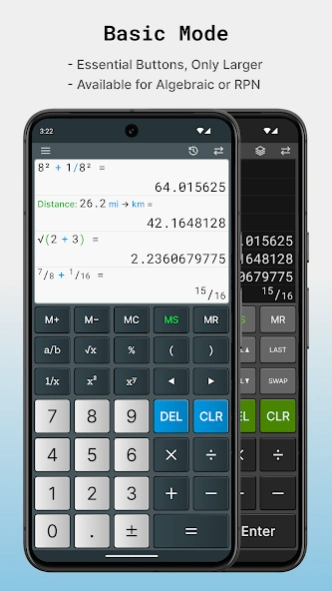
- A Basic Mode with all the Essentials
- Calculation History with 100 Records
- Memory with 10 Registers
- 12 High-Quality Themes
- Copy and Paste
- Configurable Numeric Display (Decimal and Grouping)
- Easier to use than many other Calculator Apps
- Quicker than locating your Casio & HP Calculator (11C / 15C)
SCIENTIFIC
- High Internal Precision
- Rectangular and Polar form Complex Number Support
- Real, Imaginary, Argument, Magnitude and Conjugate Functions
- Fractions and Fraction Calculations
- Convert Decimals to Fractions
- Degree, Minute, Second Support
- Standard, Scientific, Engineering and Fixed Decimal Notations
- Configurable Display Precision from 0 - 12 digits
- Table of 44 Physical Constants
- Over 300 Conversion Units across 18 Categories
- Trig Functions in Degrees, Radians or Grads
- Hyperbolic Trig Functions
- Natural and Base-10 Logarithms
- Percent and Delta Percentage
- Remainder, Absolute, Ceiling and Floor Operations
STATISTICAL
- Factorial
- Combinations and Permutations
- Random Number Generator
- 15 Single-Variable Statistics
- Quantity, Min, Max, Range, Sum, Median
- Arithmetic Mean, Geometric Mean, Mean Squared
- Sum Squared, Sum of Squares of Variance
- Sample Variance, Sample Standard Deviation
- Population Variance, Population Standard Deviation
PROGRAMMER
- Binary, Octal, Decimal and Hexadecimal
- History viewable in all Four Bases
- Convert between Bases
- Signed and Unsigned Integers (8, 16, 32 and 64-Bit)
- Cast between Integer Sizes
- Dedicated Binary-Bit Display (and Toggle) for all 64-Bits
- Bitwise Logic Operations AND, OR, XOR
- Bitwise Shift Operations
- Roll Left and Right
- Byte and Word Flipping
- Ones and Twos Complement. Native interpretation is Twos Complement
- Random Number Generator
About Scientific Calculator Plus
The company that develops Scientific Calculator Plus is CalcTastic. The latest version released by its developer is 8.1.3. This app was rated by 1 users of our site and has an average rating of 3.0.
To install Scientific Calculator Plus on your Android device, just click the green Continue To App button above to start the installation process. The app is listed on our website since 2025-09-24 and was downloaded 81 times. We have already checked if the download link is safe, however for your own protection we recommend that you scan the downloaded app with your antivirus. Your antivirus may detect the Scientific Calculator Plus as malware as malware if the download link to com.shaytasticsoftware.calctastic is broken.
How to install Scientific Calculator Plus on your Android device:
- Click on the Continue To App button on our website. This will redirect you to Google Play.
- Once the Scientific Calculator Plus is shown in the Google Play listing of your Android device, you can start its download and installation. Tap on the Install button located below the search bar and to the right of the app icon.
- A pop-up window with the permissions required by Scientific Calculator Plus will be shown. Click on Accept to continue the process.
- Scientific Calculator Plus will be downloaded onto your device, displaying a progress. Once the download completes, the installation will start and you'll get a notification after the installation is finished.
Program Details
System requirements
Download information
Pricing
Version History
version 8.1.3
posted on 2025-09-24
Minor fixes and improvements.
version 8.1.2
posted on 2025-04-27
- RPN users now have an UNDO feature that will revert the last stack operation.
- Updated power and nth-root to be more natural for each input type.
- Increased maximum history and stack sizes to 100.
- Added a setting to clear the screen when the app shuts down.
- Improved support for Android 15 devices.
- Visit the website for other minor improvements and fixes.
version 8.0.2
posted on 2024-08-26
Minor font size adjustments for narrow landscape layouts.
version 8.0.1
posted on 2024-06-30
- Updated to cleaner, more legible fonts based on all your feedback.
- Clearing the screen (CLS) in algebraic modes, now only clears your on-screen visible history.
- Fullscreen options are now available per orientation.
- The Office theme has been fully re-imagined. The Ivory theme has been fully replaced by the Instrumental theme. Many other theme assets have been refreshed.
- Trig functions now obey the angle unit (DRG) when the result is complex.
- Updated constants to the 2022 CODATA.
version 7.1.0
posted on 2024-05-02
- Improved overall error handling.
- Added specific error types including undefined, infinite, etc.
- Equation errors are now highlighted in various ways depending on their type.
- Other minor improvements and fixes.
version 7.0.1
posted on 2023-09-02
Android's best all-around calculator just got better! Equations can now be edited, and results are calculated in real-time. Plus, lots of other improvements.
version 6.7.2
posted on 2018-11-05
Minor Fixes.
version 5.5.2
posted on 2016-12-25
Bugfix
version 2.0.2
posted on 2013-06-12
Several fixes and updates
